
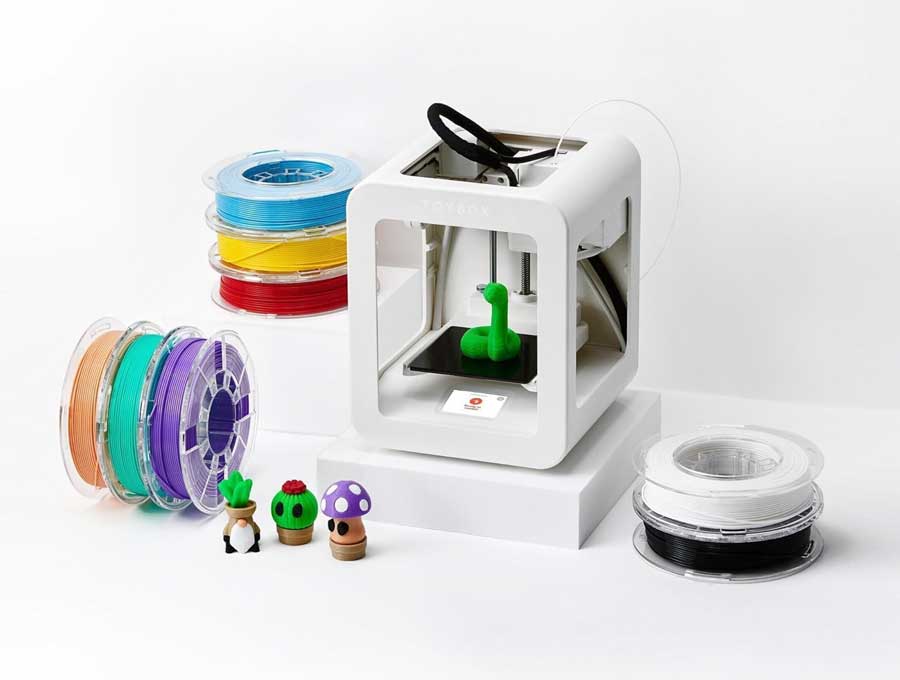
Toybox Labs is a kid-friendly 3D printing company that gained national attention after appearing on Shark Tank. Designed to make 3D printing simple and accessible, the Toybox 3D printer allows children to create toys with just a few taps using an easy-to-use app.
Unlike traditional 3D printers that require technical knowledge, Toybox focuses on simplicity, safety, and creativity, making it one of the most beginner-friendly 3D printers available.
In this complete Toybox Labs review, we take a closer look at how this kid-friendly device compares to traditional 3D printers. This Toybox 3D printer review covers everything from ease of use and features to real-world performance, helping parents decide if it’s the right choice for their family. After gaining attention on Toybox Shark Tank, the product quickly became one of the most talked-about educational tech gadgets for kids.
This Toybox Labs review also explores how the Toybox 3D printer compares to traditional 3D printers and popular STEM toys. If you’re searching for a beginner-friendly 3D printer for kids, this Toybox 3D printer review will help you understand whether it’s the right choice for your family.
This Toybox Labs review highlights why the Toybox 3D printer has become one of the most popular beginner-friendly 3D printers for kids after its appearance on Shark Tank.
What Is Toybox Labs?
Toybox Labs is a company that created the Toybox 3D Printer, a compact and beginner-friendly 3D printer designed for children.
Disclosure: As an Amazon Associate, we earn from qualifying purchases. This helps support the site at no additional cost to you.
Unlike traditional 3D printers, Toybox focuses on:
- Simplicity
- Safety
- Kid-friendly design
- Pre-loaded toy templates
Kids can select a design from the app and print toys within minutes, without needing technical knowledge.
If you’re looking for a simple, safe, and beginner-friendly 3D printer for kids, Toybox Labs stands out as one of the best options available today.
Toybox Labs Shark Tank Review
Toybox Labs appeared on Shark Tank Season 10, where founders Ben Baltes & Jenn Chin introduced their innovative 3D printer designed specifically for kids.
The founders explained that while 3D printing is powerful, most printers are too complex for children. Their goal was to create a product that removes technical barriers and allows kids to start printing immediately.
Key Highlights
- Founders: Ben Baltes & Jenn Chin
- Product: Kid-friendly 3D printer
- Shark Tank Ask: $150,000 for 5% equity
- Deal Outcome: Kevin O’Leary invested $150,000 for 13% + 2% advisory shares
Kevin O’Leary ultimately made an offer, recognizing the product’s strong potential in the growing STEM education market.
The deal helped Toybox Labs expand production, improve its software platform, and reach a larger audience of families and educators.
Did Toybox Labs Get a Deal?
👉 Yes — they secured a deal with: Kevin O’Leary
This partnership helped accelerate growth and expand distribution.
The Shark Tank Pitch
During the pitch, the founders demonstrated how easy it is for children to use the Toybox printer.
Instead of complex software, the system uses a simple app-based interface where kids can browse, customize, and print toys with just a few taps.
The Sharks were impressed by:
- The simplicity of the design
- The strong appeal to families
- The growing demand for STEM-based educational products
How Toybox Labs Works
Toybox is designed to make 3D printing as simple and accessible as possible, especially for kids and beginners with no prior experience.
Unlike traditional 3D printers that require setup, calibration, and design software, Toybox removes all complexity and turns the process into a fun, app-based experience.
Step-by-Step Process
1. Open the Toybox App
Start by opening the Toybox app on a smartphone or tablet. The app serves as the main control center for browsing, customizing, and printing toys.
2. Connect to the Printer
Connect the Toybox printer to your device using Wi-Fi. This allows you to send designs directly to the printer without cables or complicated setup.
3. Browse Available Toy Designs
Explore a large library of pre-made designs, including:
- Characters
- Animals
- Vehicles
- Creative toys
The built-in library makes it easy for kids to find something fun to print right away.
4. Customize the Object
Depending on the design, users can customize elements such as:
- Size
- Color
- Style
This adds a creative layer and allows kids to personalize their creations.
5. Tap Print
Once everything is ready, simply tap “print” in the app. The printer will begin the process automatically.
6. Watch the Toy Come to Life
The Toybox printer builds the object layer by layer right in front of you. This process is both educational and exciting, as kids can see their digital design turn into a real physical toy.
Why It’s Different
Traditional 3D printers require:
- Complex setup
- Design software
- Technical knowledge
Toybox removes all of that, making it accessible to kids as young as 5–6 years old.
👉 Want an easy 3D printer for kids? Check the latest Toybox Labs price and reviews on Amazon.
Key Features of Toybox Labs
Toybox Labs stands out as one of the most beginner-friendly 3D printers on the market. It combines simple technology with powerful creative tools, making it ideal for kids and families who want an easy introduction to 3D printing.
Below are the key features that make Toybox Labs a popular choice among parents and educators.
1. One-Tap 3D Printing
One of the most impressive features of Toybox Labs is its one-tap 3D printing system.
Instead of dealing with complicated software or settings, users can simply:
- Open the Toybox app
- Choose a design
- Tap “print”
The printer automatically handles the rest.
This streamlined process removes the typical learning curve associated with 3D printing, allowing kids to start creating within minutes. It’s one of the main reasons Toybox is considered a true beginner-friendly 3D printer for kids.
2. Kid-Friendly Design
Toybox is specifically designed with children in mind.
Key elements include:
- Simple and intuitive app interface
- Safe, enclosed printing area
- Child-friendly materials
- Minimal setup required
Unlike traditional 3D printers, which can feel technical or intimidating, Toybox focuses on ease of use and safety, making it suitable for younger users under supervision.
This thoughtful design makes it a great option for parents looking for a safe 3D printer for kids.
3. Large Toy Library
Toybox offers access to a large and continuously growing toy library.
Users can choose from:
- Action figures
- Animals
- Vehicles
- Gadgets
- Educational models
Many designs are ready to print instantly, while others can be customized.
The large selection keeps kids engaged and encourages them to experiment with new creations. This feature also adds long-term value, as new designs are regularly added to the platform.
4. Educational Value (STEM Learning)
Toybox is more than just a toy—it’s an educational tool.
It helps children develop skills in:
- Creativity
- Problem-solving
- Basic engineering concepts
- Design thinking
By turning digital ideas into physical objects, Toybox introduces kids to STEM (Science, Technology, Engineering, and Math) in a fun and interactive way.
Many parents and educators see Toybox as a valuable addition to home learning environments and classrooms.
5. Wi-Fi Connectivity
Toybox uses Wi-Fi connectivity to connect with its mobile app.
This allows users to:
- Control the printer remotely
- Send designs directly to the printer
- Access the toy library instantly
- Receive updates and new features
Because everything is app-based, there’s no need for complicated cables or manual file transfers. This makes the entire experience smoother and more accessible for beginners.
The Story Behind the Brand
Toybox Labs was founded with the mission of making 3D printing accessible to everyone—especially children.
The founders saw that while 3D printing technology was advancing rapidly, it remained difficult for beginners to use. Most printers required technical knowledge, making them unsuitable for kids.
They set out to create a solution that removed these barriers.
By focusing on:
- Simplicity
- Safety
- Creativity
They developed a product that allows kids to create physical toys from digital designs.
Before appearing on Shark Tank, the company had already gained traction through crowdfunding and early adopters. The show helped accelerate its growth and bring the product to a wider audience.
Why Toybox Labs Became So Popular
Several key factors contributed to the rapid success of Toybox Labs after its appearance on Shark Tank. The product combines education, creativity, and simplicity, making it appealing to both parents and children.
Growing Interest in STEM Education
One of the biggest drivers behind Toybox’s success is the increasing demand for STEM (Science, Technology, Engineering, and Math) learning tools.
Parents today are actively looking for products that go beyond entertainment and provide real educational value. Toybox fits perfectly into this trend by introducing children to:
- Basic engineering concepts
- Problem-solving skills
- Creative design thinking
By turning digital ideas into physical objects, Toybox helps children engage with technology in a hands-on and meaningful way.
Easy to Use
Traditional 3D printers can be complex and intimidating, especially for beginners.
Toybox removes these barriers by offering a simple, app-based experience that requires little to no technical knowledge. With its one-tap printing system, kids can start creating almost immediately.
This ease of use makes Toybox one of the most accessible 3D printers for beginners and families, significantly expanding its audience.
Creative Play and Engagement
Toybox transforms 3D printing into a fun and interactive experience.
Instead of just consuming toys, children can:
- Create their own designs
- Customize existing models
- Experiment with new ideas
This type of creative play keeps kids engaged while encouraging imagination and independent thinking. It also provides a sense of accomplishment when they see their creations come to life.
Shark Tank Exposure
Appearing on Shark Tank played a major role in Toybox Labs’ growth.
The show introduced the product to millions of viewers, instantly boosting:
- Brand awareness
- Consumer trust
- Sales momentum
The investment and exposure helped position Toybox as a credible and innovative product in the educational tech space.
Safe and Kid-Friendly Design
Safety is a major concern for parents when it comes to technology products.
Toybox addresses this by focusing on:
- Child-safe materials
- Enclosed printing design
- Simple controls
This makes the product more approachable and gives parents confidence that their children can use it safely with supervision.
Toybox Labs – 2026 Update
As of 2026, Toybox Labs continues to grow as a leading brand in the kid-friendly 3D printing space. The company has maintained strong popularity among families, educators, and beginners thanks to its focus on simplicity, creativity, and accessibility.
Since its appearance on Shark Tank, Toybox has continued to improve both its hardware and software, making the overall experience smoother and more engaging for users.
Product Expansion and Updates
The company has expanded its offerings to include:
- Updated software features that improve usability and performance
- New toy designs in the app, keeping the content fresh and engaging
- Subscription content that unlocks exclusive models and premium designs
- Improved printing technology for better quality and reliability
These updates help extend the product’s lifespan and provide ongoing value for users.
If you’re interested in more educational and innovative products, check out our complete guide to the best Shark Tank products. This helps you discover more innovative products that combine creativity, technology, and real-world usefulness.
Availability and Distribution
Toybox products are widely available through:
- Amazon
- Official Toybox website
- Online tech retailers
This broad availability makes it easy for families to purchase and start using the product.
Continued Popularity
Toybox remains popular among:
- Parents
- Educators
- Homeschool families
- Tech enthusiasts
Its combination of education + creativity keeps it relevant in the market.
Customer Reviews and Feedback
Customer feedback for Toybox Labs is generally very positive.
What Customers Like
- Extremely easy to use
- Great for kids and beginners
- Fun and engaging
- Encourages creativity
- Educational value
Many parents say their children quickly learn how to use the printer and enjoy creating toys.
Common Concerns
- Limited customization compared to advanced printers
- Ongoing cost of filament
- Requires internet/app access
These are typical trade-offs for beginner-friendly devices.
Overall Customer Sentiment
Toybox is highly rated by families looking for a simple, educational, and fun 3D printing experience.
Pros and Cons
Pros
- Very easy to use
- Designed for kids
- Encourages creativity
- Safe materials
- Compact size
Cons
- Limited advanced features
- Requires app usage
- Ongoing material costs
Toybox vs Regular 3D Printers (Quick Comparison)
| Feature | Toybox | Traditional 3D Printer |
|---|---|---|
| Ease of Use | Very easy | Complex |
| Target User | Kids | Hobbyists |
| Setup | Minimal | Advanced |
| Customization | Limited | High |
| Price | Moderate | Varies |
Toybox is best for kids and beginners who want a simple, fun, and educational 3D printing experience. Traditional 3D printers are better suited for advanced users who need more control and customization.
When comparing Toybox to regular 3D printers, the biggest difference is simplicity. Traditional 3D printers often require setup, calibration, and design software, which can be overwhelming for beginners. In contrast, this Toybox Labs review highlights how the device removes complexity with its app-based system, making it far more accessible for kids and families. While advanced users may prefer standard printers, Toybox is clearly designed for ease of use and quick results.
Compared to other STEM toys, Toybox offers a more interactive and hands-on experience. Many STEM products focus on learning concepts, but the Toybox 3D printer allows children to actually create real objects. In this Toybox 3D printer review, it stands out as a unique blend of education and creativity, going beyond typical building kits or coding toys. Its appearance on Toybox Shark Tank further boosted its credibility as both a fun and educational product.
Who Should Use Toybox Labs?
Toybox Labs is designed to make 3D printing accessible, fun, and educational, making it a great choice for a wide range of users—especially families and beginners.
It is ideal for:
Kids Interested in Creativity
Toybox is perfect for children who enjoy building, designing, and creating. Instead of just playing with toys, kids can design and print their own creations, which encourages imagination and hands-on learning.
Parents Looking for STEM Tools
Parents who want to introduce their children to STEM learning will find Toybox especially valuable. It helps kids explore basic concepts in engineering, design, and problem-solving in a fun and engaging way.
Beginners in 3D Printing
Toybox is one of the best options for people new to 3D printing. Its simple app-based system and one-tap printing remove the complexity found in traditional 3D printers, making it easy to get started.
Families Who Want Educational Toys
For families looking to combine entertainment with education, Toybox offers a unique balance. It turns screen time into interactive, productive play, where kids can create real-world objects from digital ideas.
Ideal Age Range
Toybox is especially useful for children ages 5–12, though older kids and even adults can enjoy using it as an entry-level 3D printing tool.
Because of its simplicity and safety-focused design, it works best for younger users who are just beginning to explore creative technology.
Is Toybox Labs Worth It?
For many families, Toybox Labs is worth it.
It offers:
- Educational value
- Creative play
- Easy usability
- Safe design
Best For:
- Learning and creativity
- Beginner users
- Kids and families
Not Ideal For:
- Professional design work
- Advanced 3D printing users
Because of its simplicity, educational value, and engaging experience, many parents consider Toybox Labs a worthwhile investment—especially for kids who enjoy creativity, building, and hands-on learning.
While it may not replace advanced 3D printers, it offers one of the best entry points into 3D printing for beginners and families.
This Toybox Labs review confirms that the Toybox 3D printer is one of the best beginner-friendly and educational 3D printers for kids available in 2026.
Where to Buy Toybox Labs
If you’re looking for an easy-to-use alternative to complex machines, this Toybox 3D printer review makes it clear why the product is a strong choice for beginners. Thanks to its success on Toybox Shark Tank, it has become a trusted option for families who want a simple and educational 3D printing experience.
Toybox products are available online.
Common options include:
- Amazon
- Official website
- Tech retailers
👉 Check the latest Toybox Labs price and reviews on Amazon
Related Shark Tank Products
You may also like these other inventions from Shark Tank:
- Best Shark Tank products
- Mission Belt Shark Tank review
- PhoneSoap Shark Tank review
- Squatty Potty Shark Tank review
- Bug Bite Thing Shark Tank review
- Lori Greiner Shark Tank investments
Toybox Labs FAQs
Did Toybox Labs get a deal on Shark Tank?
Yes. Kevin O’Leary invested $150,000 for 13% equity plus 2% advisory shares.
Is Toybox safe for kids?
Yes. It uses child-friendly materials and a safe design.
What age is Toybox for?
Typically ages 5 and up.
Do you need experience to use Toybox?
No. It is designed for beginners.
Is Toybox worth it?
Yes, especially for families interested in creativity and STEM learning.
Is Toybox better than a regular 3D printer?
For beginners and kids, Toybox is often a better choice because it removes complexity. However, advanced users may prefer traditional 3D printers for customization and control.
Photo: Amazon


